| Input Section | |
|
The Main Input Screens are described in this section. Asset Details Main Menu 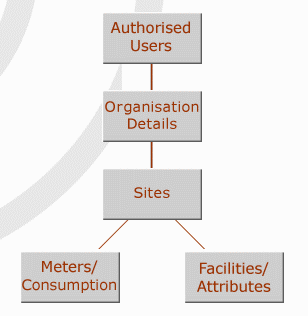 This provides links to access the areas of the application where data can be entered. For an
overview and quick reference purposes, a flow chart showing the linkages to all the
subsequent screens accessible through this menu is attached to this Guide as the very last
page.
This provides links to access the areas of the application where data can be entered. For an
overview and quick reference purposes, a flow chart showing the linkages to all the
subsequent screens accessible through this menu is attached to this Guide as the very last
page.The Authorised Users button takes you to a list of the users allowed to access data regarding your organisation. Names can be added or removed and different types of access assigned. The Organisation Details button takes you to a page where you can view and edit general information on your organisation. The Sites button takes you to a list of sites belonging to your organisation, and allows you to access information on the meters and facilities that belong to specific sites. The Meters / Consumption button takes you to a list of meters belonging to your organisation, and allows you to access their consumption data. The Facilities / Attributes button takes you to a list of all Facilities belonging to your organisation and allows you to access their Entities-details and Attributes information. | |