| Assets - [Organisation Name] Facilities List | |
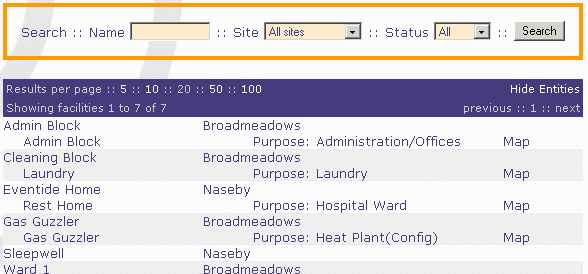 Assets - [Organisation Name] Facilities List Each Facility for the purposes of this application may be an individual building or group of buildings. The screen lists Site Name, Facility Name and (if you have clicked the Show Entities link at top right) the Entities with Purpose under each Facility. At the top of the list there is the Search box which enables you to select a new list according to the various selection criteria available. Clicking on the appropriate [Facility Name] link will bring up the Assets - [Facility Name] Details page for the selected Facility. As mentioned above, clicking on the Show Entities link re-opens the page Assets - [Organisation Name] Facilities List but which is now extended to list under each Facility, the Entity or Entities which it includes and their respective Purposes. Clicking on the Hide Entities link toggles back to the shortened list. Clicking on the Map link opens up the page Assets - [Entity Name] Energy/Utility Map giving details regarding the Meters that are supplying this Entity. Assets - [Facility Name] Details Most of the information here is self-evident. It includes some general information regarding the facility. If the facility is closed, demolished, or its use changes (e.g. an administration building is converted to a residential building) it may need to be closed. Note: Be sure that you actually want to close the Facility and not just its Record. (See Close Date in Appendix F for more details on this distinction.) If closure is required then tick the Close Facility button. On then clicking the Save Changes link, boxes appear for the Close Date to be entered. The Useful Shortcuts box allows you access details for each Entity or to scroll through the details for all other Facilities in the current listing. In particular, the Jump to link provides a drop-down list of all the other Facilities. See Appendix F for definitions of each information field. Assets - [Organisation Name] Facilities List (Extended for Entities) This is an extended list which now shows under each Facility, the Entity or Entities which it includes and their corresponding Purposes. This enables access to the details of each Entity by clicking the appropriate [Entity Name] link to obtain the Assets - Entity and Utilisation Details screen. If the Entity is a Plant, the access to its Configuration is through the Config link beside its listed Purpose. Assets - Entity and Utilisation Details This screen provides access to the boxes labelled Entity Details, Indicator Data and Utilisation Attributes. The latter two involve essentially relevant data for recording how much the Entity is used. This is the key information required for measuring energy efficiency and then the benchmarking. Some of the specific Utilisation Attributes required for a facility will vary according to its Purpose which relates to the main usage. The application also allows a sequence of separate Records to be created for each Entity so that any effects due to either actual or planned changes in usage can be monitored and costed. The frequency with which these Records should be updated will depend on the amount of variation there is in the usage concerned. An Entity with very stable usage may need few, if any, updates, but where usage varies quite considerably, either regularly or spasmodically, there may be a need for quite frequent updates covering periods as short as a month - or possibly even less in some cases. It cannot be over-emphasised that the quality (and thus the value to you) of the benchmark data reported for each Entity will be primarily determined by the accuracy and upkeep of this crucial Utilisation Attribute information. It therefore deserves careful and frequent monitoring. See Appendix G for definitions of each information field. Also note that pointing to each heading provides the same material as Ghost- Over explanatory text when the pointer covers the title of the requisite entry. To complete, edit or view the remaining Construction Attributes for the Entity click the Useful Shortcuts Construction link to obtain the Assets - Construction Attributes screen. Assets - Construction Attributes The Construction Attributes cover essentially relevant data on how the Entity is constructed; its size, shape and environment; plus details of all the relevant materials used in its construction. This is the key information required for measuring energy efficiency and then the benchmarking. Some of the specific Construction Attributes required for a facility will vary according to its designated Purpose. The application also allows a sequence of separate Records to be created for each Entity so that any effects due to either actual or planned changes in these Attributes can be monitored and costed. The main reason for new records to be created would arise from building alteration. Separate Records may be usefully created when planning significant refurbishment or improvements and again after any such work has been completed. It cannot be over-emphasised that the quality (and thus the value to you) of the benchmark data reported for each facility will be primarily determined by the accuracy and upkeep of this crucial attribute information. It therefore deserves careful and frequent monitoring. See Appendix H for definitions of each information field. Also note that pointing to each heading provides the same material as Ghost-Over explanatory text when the pointer covers the title of the requisite entry. Assets - [Site Name] Energy/Utility Map This Energy/Utility Map screen is mainly required when more than one form of energy or utility is being used and/or when the metering boundaries and those of a particular Entity do not coincide. In these cases it is necessary to determine this map so that there is a list of Energy/Utility Types, Meters used and, if necessary, the estimated percentage allocation when a Meter covers more than just the Entity listed. The application therefore allows for an unlimited number of Meters supplying each Entity to account for all energy/utility sources (e.g. electricity, gas, Plant heat, diesel for generator etc). It also can cater for an unlimited number of Entities being supplied by any individual Meter or Plant to cover the absence of Sub-Meters. The Energy/Utility Map will list an entire Site, if accessed via the Sites List page, or just one Entity, if accessed via the Facility List page through the Show Entities link. At the top of the list there is the Search box which enables you to select a new list according to the various selection criteria available. To edit the details of energy allocation of a particular Meter or Plant, click its Config link to bring up either the Assets - Meter Configuration or Assets - Plant Configuration screens respectively. The Plant Configuration screen is just the same as its counterpart for Meters described below except that it has no Useful Shortcuts available, nor does it have any listings with respect to the equivalent of sub-metering. | |